Compare labeling vendors
Data annotation RFP template
Compare requirements, pilot evidence, and vendor scores.
Read the guideDefine the labels
Give annotators and reviewers the same written rules. Use a label taxonomy, worked examples, and an edge-case log to make disagreements easier to resolve.
A data annotation guideline is the reference for what each label means, when to apply it, and how to handle uncertainty. For outsourced labeling, it also gives your team a shared basis for reviewing a vendor’s work.
A practical starting structure
Use this outline to write your own instructions. The paid kit provides an editable .docx template with a worked sample.
Fictional text-labeling example
“Label complaints” leaves room for interpretation. A more useful instruction defines the boundary and shows it in context.
| Input | Decision | Reason |
|---|---|---|
| “My parcel was due yesterday and still hasn’t arrived.” | Apply label | Reports an overdue delivery. |
| “When will my parcel arrive?” | Do not apply | A status question without a stated delivery problem. |
| “Late again.” | Escalate | The message does not identify what is late. Use the project’s context rule. |
This example illustrates how to write a rule. Adapt the labels and uncertainty policy to your own data and task.
Have a small group label the same calibration set independently. Compare disagreements against the written guideline, then revise unclear definitions and examples. Include difficult cases and record the decisions so the same question does not need to be settled twice.
Keep calibration separate from routine batch review: agreeing on the rules and estimating delivered quality answer different questions. Use the annotation QA sample size calculator when planning a simple random review sample.
Reference the guideline version in your data annotation RFP. After delivery, group review errors by type and severity, then use recurring disagreements to improve the next version. Check quality alongside annotation throughput so speed does not become the only target.
The downloadable files
The Annotation Guideline Template includes a project summary, label definitions, correct and wrong examples, edge cases, and a version log. QA Core also includes the QA System playbook and QA Tracker & Sampling Calculator.
The page above is a free guide and preview. The editable kit files are a paid download through Gumroad.
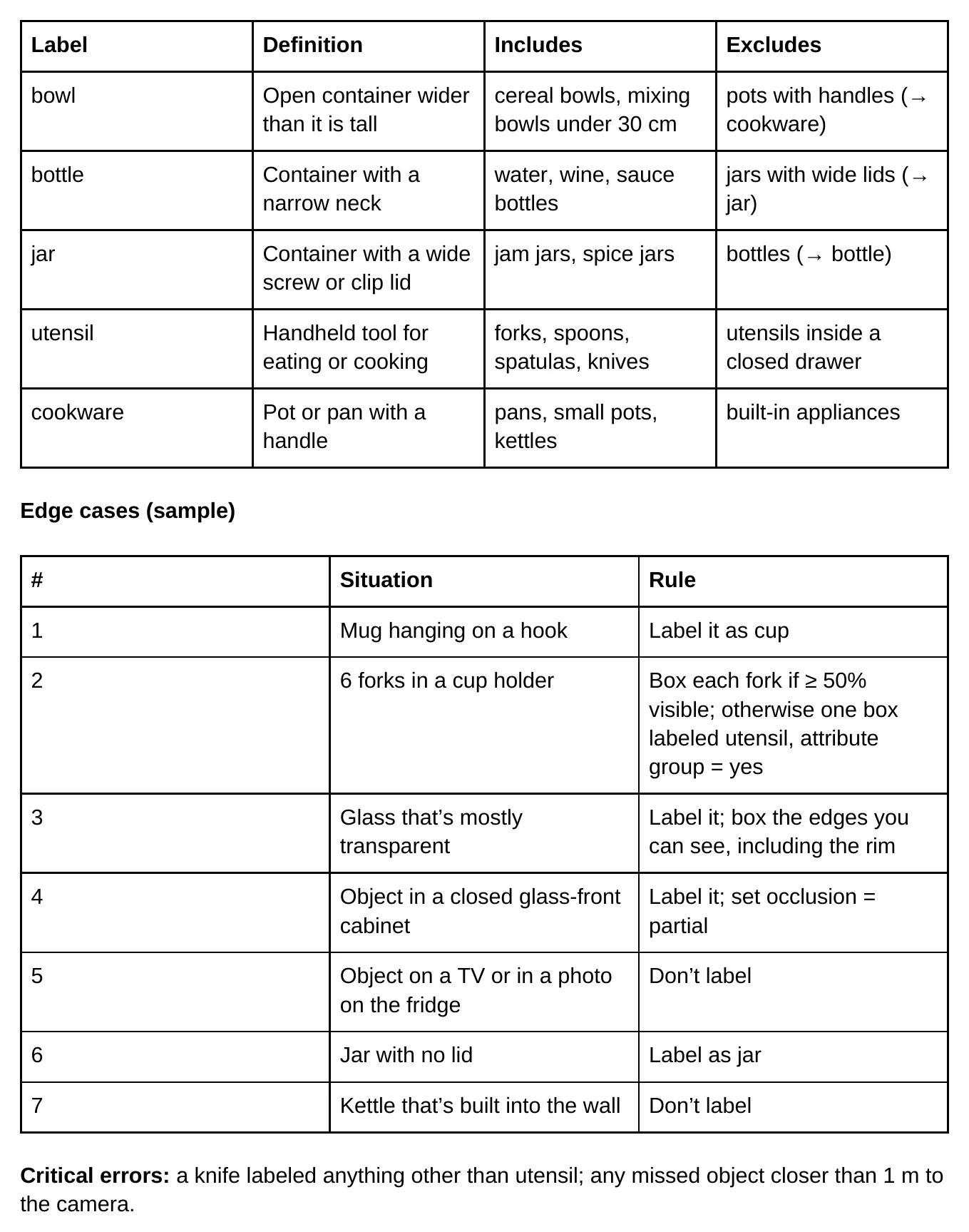
The kit contains documents and spreadsheets for your team to use. You choose your annotators or vendor and adapt the rules to your project.
The outline and example on this page are free to read. The editable Word template is included in QA Core ($99), Ops Kit ($199), and Team ($299).
The structure can be adapted to different tasks. Add task-specific rules such as bounding-box boundaries, text-span selection, or audio segmentation; validate them on your own data.
Compare labeling vendors
Compare requirements, pilot evidence, and vendor scores.
Read the guideTrack annotation operations
Track labeling output, rework, hours, and batch cycle time.
Read the guidePlanning a QA review? Use the free sample size calculator or download the free sample-size sheet and error taxonomy.