QA Core · Two Word documents + one spreadsheet
Data annotation QA templates
Define labeling rules, review vendor batches, and document quality decisions with the QA Core kit. Editable documents and a spreadsheet for in-house ML and data teams managing outsourced labeling.
Included in QA Core
Three files for annotation quality assurance
1. Annotation Guideline Template
Write the labeling rules your reviewers and vendor will use. The editable .docx includes a project summary, label definitions, correct and wrong examples, edge cases, and a version log. Preview the annotation guidelines template.
2. QA System playbook
Set quality targets, assign a QA owner, define severity levels, and agree pass/fail rules before the first batch. The playbook covers the review loop: sample, review, score, and feed errors back into the guideline. Includes worked examples for sample size, kappa, and IoU.
3. QA Tracker & Sampling Calculator
Use the .xlsx spreadsheet to plan and record reviews in Excel or Google Sheets:
- Sample size calculation and a Wilson accuracy interval
- Accept / Reject / Incomplete batch decision
- Error Log with severity and type, plus a shared Taxonomy
- Cohen’s kappa, Fleiss’ kappa for three annotators, and bounding-box IoU
- Annotator Scorecard, Batch Log, and Reviewer Log
The files are delivered as a ZIP with a README. You adapt them to your own labels, targets, reviewers, and vendor process.
See the spreadsheet
Keep the review evidence together
The tracker connects sampling, reviewed errors, agreement checks, and batch records. The documents define the rules the spreadsheet helps you apply.
You choose the acceptance policy. The kit makes that policy and the review results easier to document and discuss with the vendor.
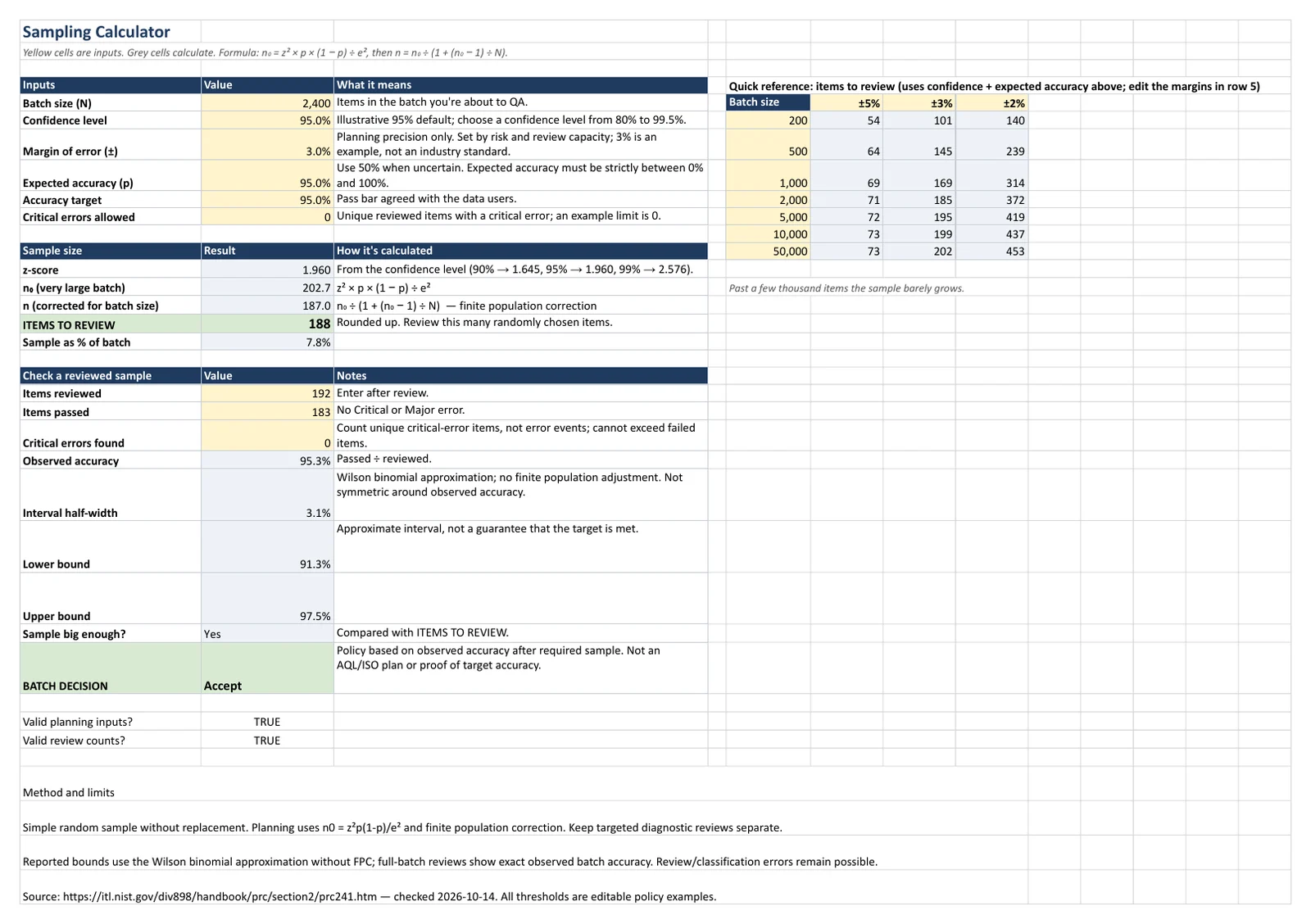
A practical batch review checklist
Use the files from instructions to decision
- Define the check. Record the batch identifier, guideline version, review owner, quality target, and critical-error rule. Clarify what makes an item pass or fail.
- Plan the review. Choose a suitable sample and document how items are selected. The free annotation QA sample size calculator plans a simple random sample for estimating an item-level pass proportion. Plan additional checks for important groups or rare errors where needed.
- Review and log errors. Check the selected items against the written rules. Record error type, severity, reviewer, and any unresolved guideline question. Keep review coverage visible.
- Record the batch decision. Apply your agreed policy to the completed review. Keep the observed accuracy, uncertainty interval, critical errors, and correction actions beside the decision. Update the guideline when recurring errors expose an unclear rule.
Sample planning and batch acceptance are different decisions. The calculator is a planning approximation; it is not an acceptance-sampling plan with specified producer and consumer risks.
Fictional worked sample from the kit
Make the numbers behind a decision visible
| Measure | Example value |
|---|---|
| Required review sample | 188 items |
| Items reviewed | 192 |
| Items passed | 183 |
| Observed accuracy | 95.3% |
| Wilson 95% interval | 91.3% to 97.5% |
| Critical errors | 0, with 0 allowed |
In the kit’s worked example, the completed review meets a 95% observed-accuracy target with no critical errors, so its stated rule produces an Accept decision. The interval still extends below 95%: that decision does not prove the full batch is at least 95% accurate.
Agree the acceptance policy before reviewing the batch. Your project may need a different threshold, additional review, or stricter treatment of critical errors.
Questions about QA Core
Is this annotation software or a managed labeling service?
QA Core contains two editable documents and one spreadsheet. Your team runs the process with its own reviewers and annotation vendor. It does not provide annotation workers or a hosted labeling platform.
Does QA Core work in Excel?
Yes. The QA Tracker works in Excel or Google Sheets, and the documents open in Word or Google Docs. The separate Throughput Tracker in Ops Kit requires Google Sheets for live summary results.
Can I try anything before buying?
Yes. Use the free sampling calculator or download the free sample-size spreadsheet and error taxonomy, with no email required. The free download does not include the paid batch-decision tracker or playbooks.
Does QA Core include the vendor RFP or throughput files?
Those are included in Ops Kit ($199) and Team ($299). QA Core ($99) includes the Annotation Guideline Template, QA System playbook, and QA Tracker & Sampling Calculator. Compare the plans.
What license and refund policy apply?
QA Core is a single-user purchase. Team covers up to 10 people at one company. A full refund is available within 14 days by contacting us through your Gumroad receipt. Read the terms of sale and license for the full conditions.
Get QA Core
The Annotation Guideline Template, QA System playbook, and QA Tracker & Sampling Calculator. $99, one time. Sales tax or VAT is added at checkout where applicable.
Selecting a provider? Read how to evaluate data annotation vendors or explore the Vendor RFP Kit. For delivery reporting, see the annotation throughput tracker.